macOS Cacher
Pre-stage the full macOS Monterey installer on Mac endpoints so upgrade and reimage workflows run from local disk
Worklet Details
What the macOS installer cacher does
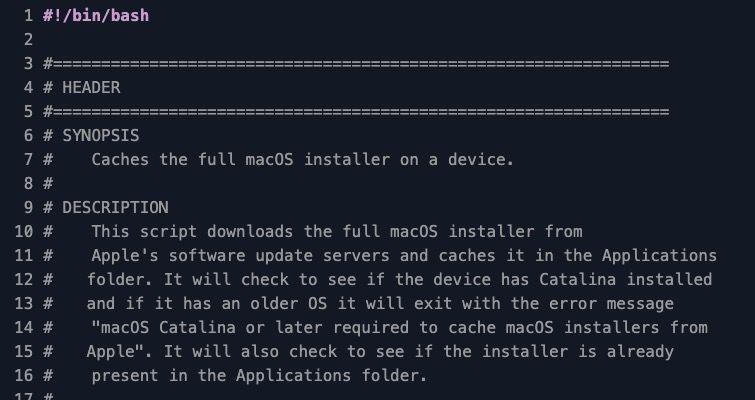
This Automox Worklet™ pre-stages the full macOS Monterey installer on a Mac endpoint by invoking softwareupdate --fetch-full-installer against Apple's software update servers. The Worklet inspects /Applications/Install macOS Monterey.app/Contents/SharedSupport/SharedSupport.dmg as the presence marker, only triggers a download when the installer is missing, and exits cleanly if the endpoint is already on Monterey or older than Catalina.
Pre-staging the installer separates the slow, bandwidth-heavy download from the upgrade itself. Once Install macOS Monterey.app lives in /Applications, you can drive the actual upgrade with startosinstall, an MDM command, or a downstream Worklet without waiting on a 12 GB pull from Apple's CDN. The Worklet defaults to macOS Monterey 12.2.1. Adjust the macOSName and macOSVersion variables at the top of the remediation script to target a different release. Available installer versions are visible on the endpoint with softwareupdate --list-full-installers.
Why cache the macOS full installer on endpoints
A scheduled macOS upgrade that fetches the installer at runtime burns 12 GB of WAN per endpoint and gates the upgrade window on Apple's CDN. Caching the installer ahead of time decouples the download from the maintenance window, so the upgrade step runs against local disk and completes in minutes instead of hours.
Pre-staging also makes recovery faster. When a Mac needs a fresh OS image after corruption, a kernel panic loop, or a failed update, the installer is already on disk and an admin can run startosinstall without re-downloading. Run this Worklet against the Mac fleet a week before a planned upgrade so the bandwidth cost is amortized and the upgrade window is predictable.
How macOS installer caching works
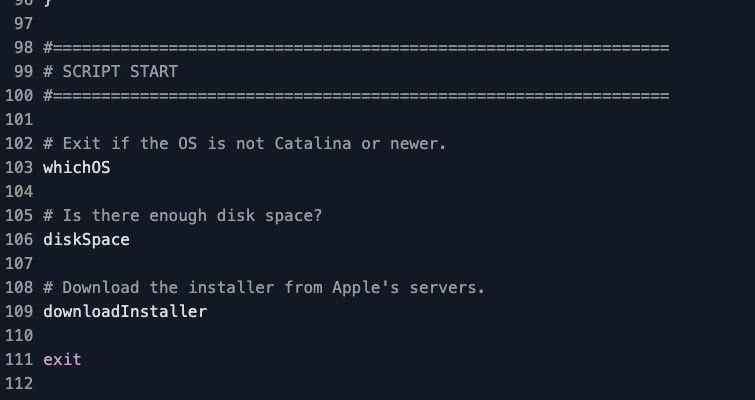
Evaluation phase: The evaluation script reads the Darwin kernel version with uname -r and exits 0 if the endpoint is already on macOS Monterey (Darwin 21) or older than Catalina (Darwin less than 19). On Catalina, Big Sur, or any release the script does not explicitly skip, it checks for /Applications/Install macOS Monterey.app/Contents/SharedSupport/SharedSupport.dmg. If that file exists, the endpoint is compliant and exits 0. If the dmg is missing, the script exits 1 and Automox schedules remediation.
Remediation phase: The remediation script re-validates the Darwin version, then runs a disk space check against / and exits non-zero if free space is below 20 GB. With those gates passed, it runs softwareupdate --fetch-full-installer --full-installer-version 12.2.1 to download the installer into /Applications. The script then re-checks for SharedSupport.dmg to confirm the installer landed on disk and writes a stderr message to the activity log if the download or post-check fails.
macOS installer caching requirements
macOS Catalina (Darwin 19) or later on the target endpoint – softwareupdate --fetch-full-installer is only available on Catalina and newer, and the script exits with the message "macOS Catalina or later required to cache macOS installers from Apple" on older releases
At least 20 GB of free disk space on the root volume – the remediation script enforces this floor before invoking softwareupdate
Outbound HTTPS to Apple's software update servers (swcdn.apple.com, swscan.apple.com) so softwareupdate can fetch the installer payload
Root execution context, which the Automox agent already provides – softwareupdate --fetch-full-installer writes into /Applications and requires elevated privileges
To target a release other than Monterey 12.2.1, update the macOSName and macOSVersion variables at the top of both evaluation.sh and remediation.sh – list available versions on a sample endpoint with softwareupdate --list-full-installers
Expected state after the installer is cached
After successful remediation, /Applications/Install macOS Monterey.app exists on the endpoint and /Applications/Install macOS Monterey.app/Contents/SharedSupport/SharedSupport.dmg is present. The activity log records "The macOS Monterey installer is now on this device." and the Worklet exits 0. Subsequent evaluations exit immediately because the dmg presence marker is found, so the policy stays quiet until something removes the installer.
Validate the cached installer by running /Applications/Install\ macOS\ Monterey.app/Contents/Resources/startosinstall --usage on the endpoint, which prints the supported arguments and confirms the installer is intact. From there a follow-on Worklet, an MDM command, or a hands-on admin can run startosinstall --agreetolicense --nointeraction to trigger the in-place upgrade against the locally cached image, with no further download required.
Loading...
Consider Worklets your easy button
What's a Worklet?
A Worklet is an automation script, written in Bash or PowerShell, designed for seamless execution on endpoints – at scale – within the Automox platform. Worklets deploy named-CVE mitigations within hours of disclosure, perform configuration, remediation, and install or remove applications and settings across Windows, macOS, and Linux.

AUTOMOX + WORKLETS™
Supercharge your endpoint management
Uncover new possibilities with simple, powerful automation.
By submitting this form you agree to our Master Services Agreement and Privacy Policy