Disable Sending Diagnostic Data to Apple
Disable Apple diagnostic and analytics transmission on macOS endpoints by writing AutoSubmit false to DiagnosticMessagesHistory.plist
Worklet Details
What the macOS diagnostic data Worklet does
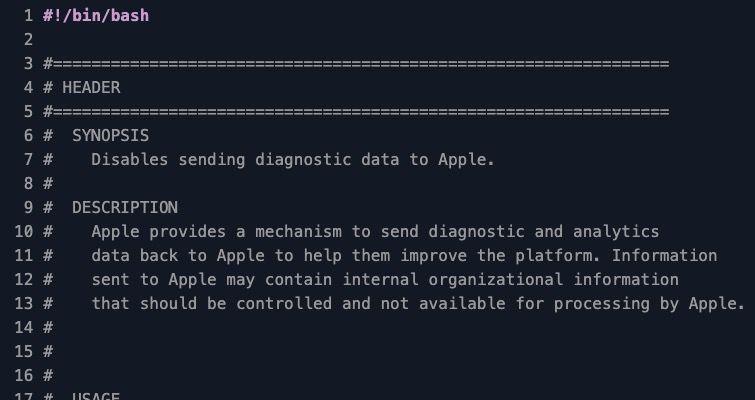
This Automox Worklet™ disables the automatic transmission of diagnostic and analytics data from macOS endpoints to Apple. macOS ships with the AutoSubmit flag in /Library/Application Support/CrashReporter/DiagnosticMessagesHistory.plist set to true, which causes the endpoint to send crash reports, kernel panic traces, and usage telemetry to Apple servers. The Worklet writes that value to false using the macOS defaults command, then resets the plist permissions and group so a standard user cannot toggle the setting back on.
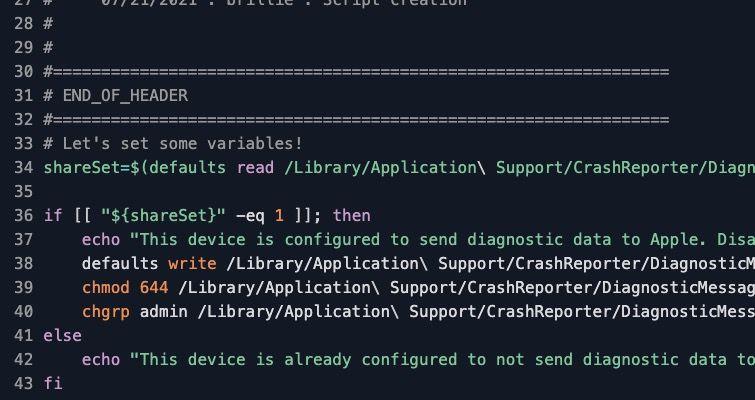
The script reads the current AutoSubmit value during evaluation and exits cleanly when sharing is already disabled. Remediation runs only on endpoints where AutoSubmit is set to 1, so endpoints already in the disabled state generate no churn in policy activity logs.
Why disable Apple diagnostic data transmission
Diagnostic and analytics submissions from macOS endpoints can include process names, application crash signatures, hardware identifiers, and partial paths from files open at the time of a fault. For organizations bound by GDPR, HIPAA, FedRAMP Moderate, or PCI-DSS, that outbound flow is an unsanctioned data path that has to be documented or shut off. The CIS macOS Benchmark addresses this directly: control 2.6.1 (Disable Sending Diagnostic and Usage Data to Apple) requires AutoSubmit in DiagnosticMessagesHistory.plist to be set to false on managed endpoints. Hardening guides aligned with NIST 800-53 controls SC-7 (boundary protection) and SI-12 (information handling and retention) treat unmanaged telemetry to a third-party cloud as a finding.
AutoSubmit can revert in two predictable ways: a macOS upgrade can re-enable the default Share Mac Analytics state, and a user with admin rights can flip the toggle back on in System Settings under Privacy and Security, Analytics and Improvements. This Worklet re-asserts the AutoSubmit baseline on every evaluation, so the next scheduled pass catches an endpoint that came back online with the default-on state before it becomes an audit finding.
How the AutoSubmit lockdown works
Evaluation phase: The Worklet runs defaults read /Library/Application Support/CrashReporter/DiagnosticMessagesHistory.plist AutoSubmit and inspects the returned value. If AutoSubmit equals 1, the endpoint is actively transmitting diagnostic data to Apple and the script exits 1 to signal that remediation is required. Any other return value (0, false, or a missing key on a freshly imaged endpoint) results in a clean exit 0 and no further action.
Remediation phase: The Worklet writes AutoSubmit to false using defaults write … -bool false, then runs chmod 644 and chgrp admin against DiagnosticMessagesHistory.plist. Resetting the file to mode 644 owned by the admin group means a standard user cannot rewrite the value through the System Settings UI or through their own defaults command. The next evaluation pass returns 0 and the endpoint stops appearing in the policy's non-compliant list.
macOS diagnostic baseline requirements
Any macOS release that exposes /Library/Application Support/CrashReporter/DiagnosticMessagesHistory.plist. The path has been stable across currently supported macOS versions through macOS 15 Sequoia.
Root execution context. The Automox Agent runs the script as root, which is required to write to /Library/Application Support/CrashReporter/DiagnosticMessagesHistory.plist.
Bash 3.2+ and the macOS defaults binary at /usr/bin/defaults. Both are present on every supported macOS release.
macOS workstation and server endpoints. The Worklet is safe on macOS Server installations and on Mac mini hardware acting as build agents.
FixNow compatible. Operators can trigger the Worklet on a specific endpoint or device group during an audit window without waiting for the next scheduled policy run.
Expected AutoSubmit state after remediation
After a successful run, DiagnosticMessagesHistory.plist contains AutoSubmit = false, file permissions are 644, and the file group is admin. macOS stops sending crash and analytics payloads to Apple's diagnostic endpoints, and standard users cannot re-enable the Share Mac Analytics toggle in System Settings because they lack write access to the plist. End user experience, application performance, and update behavior are unchanged.
Operators can confirm compliance by re-running the policy in evaluation mode and looking for exit code 0 across the fleet, or by spot-checking an endpoint with defaults read /Library/Application\ Support/CrashReporter/DiagnosticMessagesHistory.plist AutoSubmit and expecting the value 0. For audit evidence under CIS 2.6.1, the Automox console activity log captures the timestamp, endpoint identifier, and exit status of every run.
Loading...
Consider Worklets your easy button
What's a Worklet?
A Worklet is an automation script, written in Bash or PowerShell, designed for seamless execution on endpoints – at scale – within the Automox platform. Worklets deploy named-CVE mitigations within hours of disclosure, perform configuration, remediation, and install or remove applications and settings across Windows, macOS, and Linux.

AUTOMOX + WORKLETS™
Supercharge your endpoint management
Uncover new possibilities with simple, powerful automation.
By submitting this form you agree to our Master Services Agreement and Privacy Policy