Enforced App Uninstall
Remove unauthorized applications from macOS endpoints with continuous, scheduled enforcement of the software baseline
Worklet Details
What the macOS application removal Worklet does
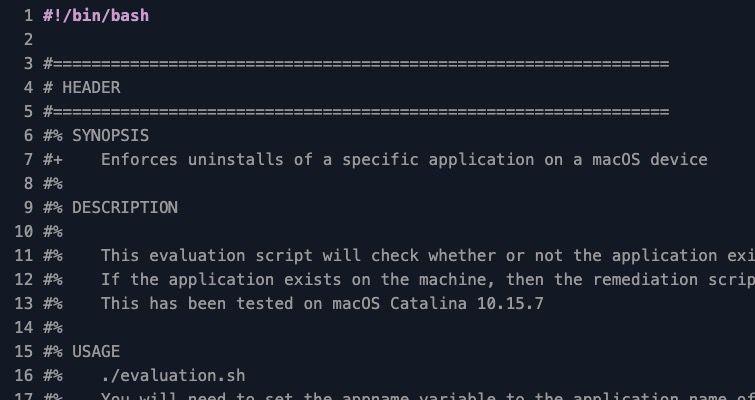
This Automox Worklet™ removes a specified application from macOS endpoints and re-removes it on every policy run. The Worklet checks /Applications for the target .app bundle, and when the bundle is present it deletes the entire directory with rm -rf. Endpoints that no longer have the application installed report compliant and skip remediation.
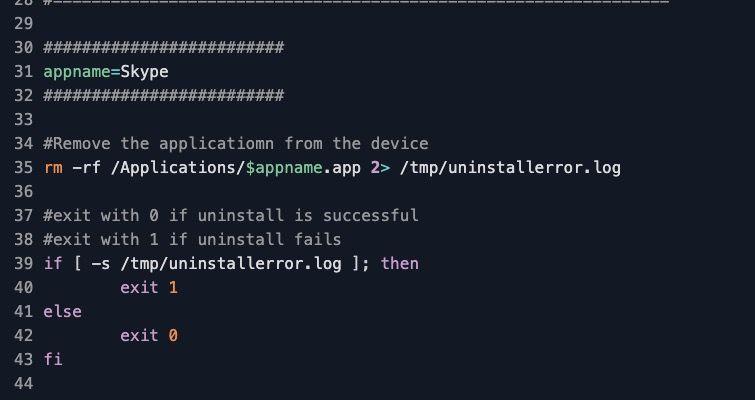
You name the target application by setting the appname variable in both evaluation.sh and remediation.sh. The default value targets Skype, but the same Worklet retires any application that installs into /Applications/<name>.app. Common targets include end-of-life software with known CVEs, unauthorized communication tools, screen recorders that bypass DLP, and trial installs that landed on the laptop without an IT review.
The evaluation phase only triggers remediation when it finds the named .app bundle present, so a recurring policy stays quiet on the endpoints that already pass and only fires rm -rf where the app has reappeared. A user who downloads the installer again from a browser session is back in the non-compliant state on the next evaluation, the next remediation deletes the bundle, and any failure path writes to /tmp/uninstallerror.log so it surfaces in the Automox activity log.
Why enforce a macOS application removal baseline
Prohibited software on a Mac is rarely a one-time problem. Users reinstall communication tools that bypass corporate channels, install trial versions of CAD or screen-recording utilities, and pull end-of-life apps off vendor archives long after the security team has marked them retired. Each reinstall reopens whatever risk the original removal was meant to close: an unpatched CVE in an unsupported version, a data path that bypasses DLP, a license the organization no longer carries, or a SOC 2 control that depends on a clean software inventory.
Schedule this Worklet against the macOS device group that holds the affected hardware (developer laptops, kiosk Macs, or contractor builds) on the same cadence as your software inventory sweep. The ls /Applications check confirms the named bundle is gone on every pass; if the bundle reappears between runs, rm -rf removes it again and the audit log reflects the recurrence rather than a one-time uninstall.
How macOS application removal works
Evaluation phase: The Worklet reads the appname variable and runs [ -d /Applications/$appname.app ] to test whether the bundle directory is present on the endpoint. If the directory exists, the script exits 1 and Automox schedules remediation. If the directory is missing, the script exits 0 and the endpoint reports compliant for this policy run.
Remediation phase: The remediation script runs rm -rf /Applications/$appname.app and redirects stderr to /tmp/uninstallerror.log. After removal, the script tests the log with [ -s /tmp/uninstallerror.log ]; an empty log returns exit 0 and a compliant result, and any content in the log returns exit 1 with the failure detail attached to the Automox activity record. The next scheduled evaluation re-runs the directory check, so reinstalls are caught and removed on the next cycle.
macOS application removal requirements
macOS Catalina (10.15) or later, including Big Sur, Monterey, Ventura, Sonoma, and Apple Silicon endpoints
Target application installed under /Applications as a standard .app bundle (apps inside ~/Applications or /Applications/Utilities require a path adjustment)
Set the appname variable in both evaluation.sh and remediation.sh to the exact bundle name without the .app suffix (for example, Skype, Slack, TeamViewer)
Root-level execution provided by the Automox agent (no additional permissions to configure)
Active processes for the target application should be terminated before remediation to avoid lingering helper processes; pair this Worklet with a pkill or osascript stop policy when the application launches background agents
Expected state after macOS application removal
After successful remediation, /Applications/<appname>.app no longer exists on the endpoint. Spotlight no longer surfaces the application, Launchpad drops the tile on the next refresh, and any Dock icon pointing at the removed bundle shows as a question mark until the user removes it. Subsequent policy runs report the endpoint as compliant without re-running remediation, because the evaluation phase finds the bundle missing and exits 0.
To validate the removal in a terminal session, run ls /Applications/ | grep -i <appname> and confirm no output, then inspect /tmp/uninstallerror.log for any errors written during remediation. For audit evidence, capture the Automox activity log entry showing the exit code and timestamp; for a deeper sweep, also check ~/Library/Application Support/<vendor>, ~/Library/Preferences/<bundle-id>.plist, and /Library/LaunchAgents/ for residual files. This Worklet removes the .app bundle only and does not delete user-level preferences or LaunchAgents; pair it with a follow-up cleanup policy when full software hygiene is required for your SOC 2 or CIS Benchmark control.
Loading...
Consider Worklets your easy button
What's a Worklet?
A Worklet is an automation script, written in Bash or PowerShell, designed for seamless execution on endpoints – at scale – within the Automox platform. Worklets deploy named-CVE mitigations within hours of disclosure, perform configuration, remediation, and install or remove applications and settings across Windows, macOS, and Linux.

AUTOMOX + WORKLETS™
Supercharge your endpoint management
Uncover new possibilities with simple, powerful automation.
By submitting this form you agree to our Master Services Agreement and Privacy Policy