Enable Locate Database
Activate the macOS locate database to give IT teams millisecond file search across every Mac endpoint
Worklet Details
What the locate database activator does
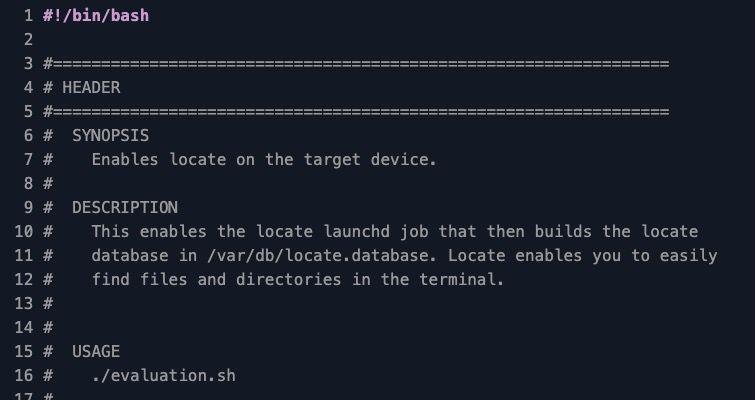
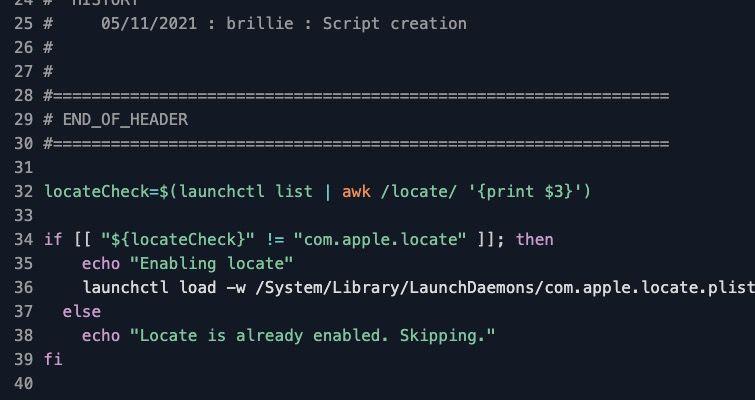
This Automox Worklet™ enables the com.apple.locate launchd job on macOS endpoints so the system builds and maintains the locate database at /var/db/locate.database. The Worklet inspects the running launchd job table, and if com.apple.locate is missing, it loads the LaunchDaemon plist with launchctl. Endpoints that already have the service running are skipped, so a recurring policy run against a mixed Mac population costs nothing on already-compliant endpoints.
The locate database is a sorted, front-compressed index of filesystem paths that the locate(1) command queries to return matches in milliseconds. Without the database, IT admins fall back on find / -name <pattern>, which traverses the entire volume on every invocation and can take minutes against large home directories, external volumes, or network mounts. Enabling the launchd job once is the prerequisite for every other file-search workflow on the endpoint, including incident triage, configuration verification, and forensic timeline collection.
The remediation runs launchctl load -w /System/Library/LaunchDaemons/com.apple.locate.plist, which loads the job and writes a persistent override so the service survives reboot. The companion job com.apple.update.locate then runs on the system schedule (weekly by default) and refreshes the database by calling /usr/libexec/locate.updatedb, the macOS-shipped variant of the classic Unix updatedb command.
Why activate the locate database on Mac endpoints
File search is one of the most-used IT diagnostic primitives on macOS, and the launchd job that backs it is unloaded by default on a fresh install. A Mac admin troubleshooting an incident on a remote endpoint, looking for a stray .mobileconfig, a rogue LaunchAgent under ~/Library/LaunchAgents/, or a log file referenced in a vendor support ticket, has two real options: locate <pattern> for an indexed lookup, or find / -iname <pattern> for a full walk. The indexed lookup returns in milliseconds; the walk can stall a remote shell for several minutes on a developer Mac with a populated home directory. The locate launchd job is what makes the first option available.
macOS already ships /usr/libexec/locate.updatedb, com.apple.locate.plist, and the locate binary; activating the launchd job by hand on each new endpoint is the part that does not scale. A single Automox policy enables com.apple.locate on every targeted Mac in one pass, and subsequent evaluations confirm the service stayed loaded after image refreshes, OS upgrades, or user-initiated launchctl unload commands.
How locate database activation works
Evaluation phase: The Worklet runs launchctl list and pipes the output through awk to look for com.apple.locate in the job table. If the service is present, the Worklet exits 0 and Automox marks the endpoint compliant. If the service is missing or unloaded, the Worklet exits 1, which signals the policy to schedule the remediation phase. The check is intentionally minimal, so a recurring policy can run it on a tight cadence without measurable agent load.
Remediation phase: The Worklet executes launchctl load -w /System/Library/LaunchDaemons/com.apple.locate.plist. The -w flag clears the Disabled key in the override database at /var/db/com.apple.xpc.launchd/disabled.plist, which makes the change persist across reboots and across the next System Update. If the service was already loaded, the script prints a skip message and exits cleanly without modifying any state, so the remediation is idempotent on hosts that drifted into compliance between evaluations.
Locate database activation requirements
macOS 10.12 (Sierra) or later, where com.apple.locate ships as a system LaunchDaemon
Root privileges for launchctl load against /System/Library/LaunchDaemons/ (the Automox agent context already satisfies this)
The /System/Library/LaunchDaemons/com.apple.locate.plist file present and unmodified by an MDM profile that disables the service
Sufficient free space under /var/db for the locate.database file – typical size is 10–50 MB depending on volume contents
Volumes intended to appear in locate results must be mounted when com.apple.update.locate runs; unmounted external drives and disconnected network shares are skipped by that update cycle
No conflicting com.apple.locate.plist override in /Library/LaunchDaemons/ that re-disables the job after launchctl load
Expected state after locate database activation
After remediation, launchctl list | grep com.apple.locate returns a line whose label column reads com.apple.locate and whose PID column is either a numeric PID (the updatedb run is in progress) or - (the job is loaded and waiting for its next scheduled run). The first locate.database build happens automatically within roughly seven days under the default com.apple.update.locate schedule. Admins who need the database immediately can force a build by running sudo /usr/libexec/locate.updatedb on the endpoint, which writes /var/db/locate.database directly.
Validate by running locate sshd_config or locate /etc/hosts on the endpoint and confirming the command returns a result within a second. A first-time activation will return a transient warning – WARNING: The locate database (/var/db/locate.database) does not exist – until the updatedb job has run at least once; that warning disappears after the first build completes. The activation is sticky: locate stays enabled across reboots and macOS minor updates, and the next Automox evaluation reports the endpoint as compliant without re-running remediation.
Loading...
Consider Worklets your easy button
What's a Worklet?
A Worklet is an automation script, written in Bash or PowerShell, designed for seamless execution on endpoints – at scale – within the Automox platform. Worklets deploy named-CVE mitigations within hours of disclosure, perform configuration, remediation, and install or remove applications and settings across Windows, macOS, and Linux.

AUTOMOX + WORKLETS™
Supercharge your endpoint management
Uncover new possibilities with simple, powerful automation.
By submitting this form you agree to our Master Services Agreement and Privacy Policy