Disable Printer Sharing
Disables printer sharing on macOS endpoints with cupsctl to close the CUPS IPP listener and harden the baseline
Worklet Details
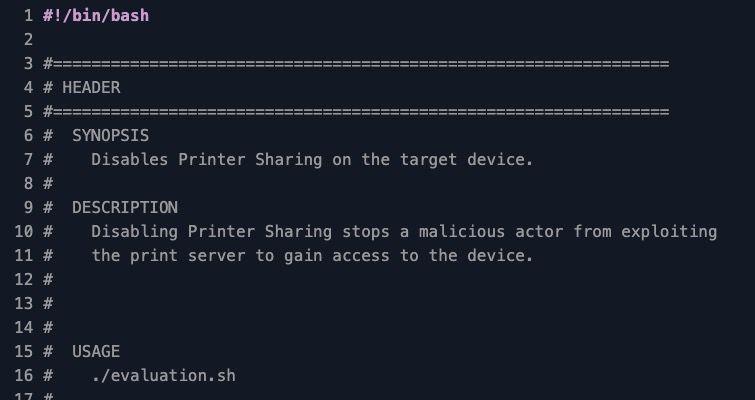
What the macOS printer sharing disabler does
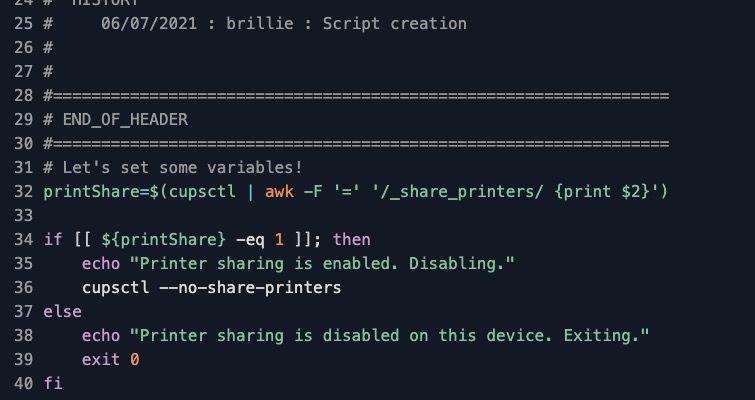
This Automox Worklet™ turns off the macOS Printer Sharing service by toggling the CUPS _share_printers flag. The Worklet shells out to cupsctl, parses the current value of the flag, and treats anything other than 0 as a non-compliant state. When sharing is on, the remediation script runs cupsctl --no-share-printers to close the IPP listener and stop the endpoint from accepting print jobs from other hosts.
The Worklet reads the live CUPS configuration rather than the System Settings preference pane, so it sees the actual daemon state even when the UI is hidden behind MDM restrictions or a managed profile. Because the change is written to /etc/cups/cupsd.conf and applied by the running cupsd process, it persists across logout and reboot, and it does not require a launchctl unload of org.cups.cupsd to take effect.
Evaluation is idempotent. An endpoint already reporting _share_printers=0 exits 0 with no change, so weekly policy runs against a population that mixes user workstations and lab Macs cost almost nothing to maintain.
Why disable printer sharing across the macOS fleet
Printer Sharing on macOS opens the CUPS IPP listener on TCP 631 and advertises the local spooler over Bonjour. A user who flips the toggle once to print a boarding pass leaves the laptop accepting jobs from any host on the same network, including coffee-shop guest VLANs and conference Wi-Fi. CUPS has shipped multiple critical CVEs over its history (the cups-browsed and cups-filters chain in CVE-2024-47176 and CVE-2024-47177 is the most recent example) and every additional endpoint with the listener enabled widens the blast radius when the next CUPS bug lands. CIS macOS Benchmark control 2.3.3.6 calls for disabling Printer Sharing on user endpoints for exactly this reason, and SOC 2 and HIPAA assessors treat an open print service on a corporate laptop as an avoidable finding.
_share_printers flips back on in three predictable ways: curious users toggle Sharing in System Settings, support scripts run during a triage call leave the flag enabled, and Migration Assistant restores a profile from a personal Mac that had sharing on. This Worklet re-asserts the Printer Sharing baseline on every evaluation, so the next pass catches the toggle before it becomes an audit finding or the next exposed surface in a CUPS advisory.
How CUPS printer sharing enforcement works
Evaluation phase: The Worklet runs cupsctl and pipes the output through awk -F '=' to extract the _share_printers field. A value of 1 means the CUPS daemon is accepting remote print jobs, so the script echoes a remediation message and exits 1 to mark the endpoint non-compliant. A value of 0 (or an absent field on a freshly installed system) exits 0 and leaves the endpoint alone.
Remediation phase: The remediation script re-reads _share_printers (in case the state changed between policy evaluation and execution), and when it is still 1, runs cupsctl --no-share-printers. The cupsctl call rewrites the relevant directives in /etc/cups/cupsd.conf and signals the cupsd process to reload, which drops the TCP 631 listener and removes the Bonjour advertisement without requiring a manual launchctl bootout or a reboot.
Printer sharing hardening requirements
macOS endpoint with CUPS installed and the org.cups.cupsd LaunchDaemon enabled (the macOS default on every supported release)
Root context for the Automox agent so cupsctl can write to /etc/cups/cupsd.conf (this is the agent default; no extra configuration needed)
No MDM configuration profile that forces Printer Sharing on (an active profile re-enables the flag at the next sync and will outvote this Worklet)
FixNow compatible – use the FixNow button to remediate during incident response without waiting for the next scheduled policy window
Expected CUPS state after remediation
After remediation, cupsctl reports _share_printers=0, and System Settings → General → Sharing shows Printer Sharing toggled off. The local user can still print to network printers and directly attached printers, because the change only stops the spooler from accepting inbound jobs from other hosts. Outbound printing through IPP, AirPrint, and USB is untouched.
Verify on a sample endpoint by running cupsctl | grep _share_printers and confirming the value is 0. As a network-side check, run lsof -iTCP:631 -sTCP:LISTEN on the endpoint (or nmap -p 631 from a peer host on the same VLAN) and confirm cupsd is no longer bound on the public interface. For audit evidence, capture the cupsctl output and the Automox policy run identifier together; both surface in activity logs and exit code 0 from the evaluation script is the canonical signal that the endpoint is in the desired state. If the next policy cycle finds the flag flipped back on, the Worklet will quietly re-disable it without operator intervention.
Loading...
Consider Worklets your easy button
What's a Worklet?
A Worklet is an automation script, written in Bash or PowerShell, designed for seamless execution on endpoints – at scale – within the Automox platform. Worklets deploy named-CVE mitigations within hours of disclosure, perform configuration, remediation, and install or remove applications and settings across Windows, macOS, and Linux.

AUTOMOX + WORKLETS™
Supercharge your endpoint management
Uncover new possibilities with simple, powerful automation.
By submitting this form you agree to our Master Services Agreement and Privacy Policy