
Automox MCP Server
Complete Agentic Tooling for Governed Endpoint Operations
Automox MCP Server makes AI-assisted endpoint management more visual, more trustworthy, and more actionable.
Talk like a human. Get AI-powered answers.
Response ready
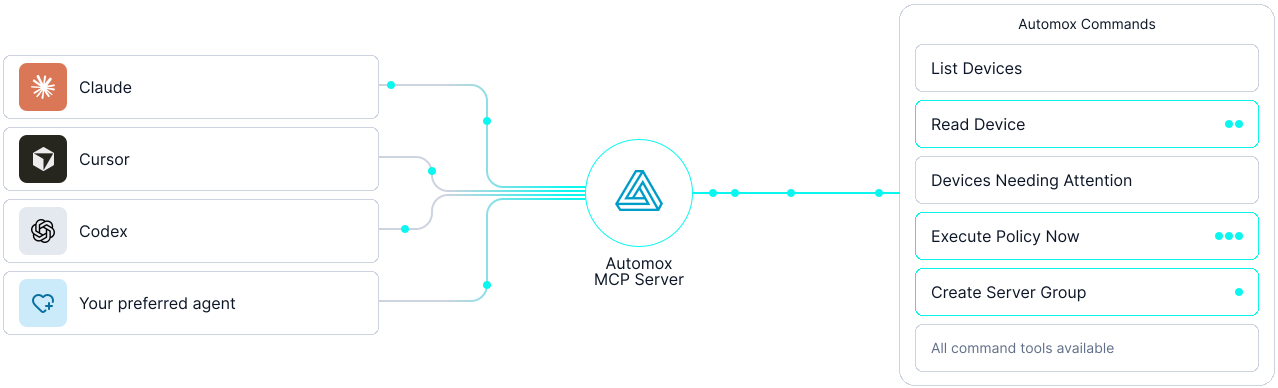
What Is Automox MCP?
Automox MCP Server connects your AI agent to Automox, so your team works in plain language instead of memorizing console paths, API calls, and report locations. MCP, or Model Context Protocol, is the standard that makes this work: a structured way for AI agents to reach external systems through governed tools.
Those tools cover the published Automox Console and Webhooks APIs, with the operations that would expose secrets withheld by design. Now, that connection can also be centrally hosted, with no local server required. Plus, the Automox MCP Server is now available directly in Claude.
For the multi-step jobs IT teams run often, Automox MCP ships guided workflows: Patch Tuesday prep, investigating a non-compliant endpoint, auditing a policy, onboarding a group, triaging a failed action, and reviewing security posture. Each lays out the steps for that task, so the assistant runs them the same way every time. The workflow library is open source, so your team can adapt these or add your own to match how you run operations.
What's new in MCP
For more details, view full changelog on Github.
Hosted by Automox
Until now, each admin ran the MCP server locally and kept it updated. Now Automox hosts it: point your MCP client at the hosted MCP service, authenticate with your API key, and you're connected. Because Automox hosts the MCP server, your whole team is on the same, latest version. No per-admin installs drifting out of date.
Interactive review surfaces
Compliance triage, patch approval queues, policy blast-radius previews, remediation reviews, and RBAC access certification now render visually inside supported hosts. Review posture in context instead of parsing text output.
Patch by Severity policy creation
Create Patch by Severity policies directly from your AI agent. Choose any combination of Automox severity levels and move from natural-language intent to governed policy creation.
Live capability discovery
The AI agent can see which tools are available, withheld, and safety-gated. It can tell you exactly what setting is required to enable any capability. No guessing. No assuming access that isn't there.
Structured fallback for unsupported hosts
If your MCP client doesn't yet support interactive surfaces, you still get the same information as clean structured data. No functionality lost.
Multi-user access, existing RBAC applied
Activity resolves to individual users instead of a single shared key, with access governed through Automox API authorization, RBAC, and org scope. A step toward enterprise-ready access, built on the roles your team already has.
Agentic Tools, Governed from the Get-go
Complete coverage doesn't mean unchecked access
Automox MCP is built for human-controlled automation. Read-only mode, per-tool safety hints, confirmation prompts, opt-in gates for high-impact actions, and secret-handling protections keep customers in control at every step. The AI agent can surface insight and prepare action. You decide what runs.
Access is governed through the connected Automox API key, so MCP respects Automox API authorization, RBAC, and org scope. For enterprise deployments, this means teams can extend Automox into agentic workflows without bypassing the controls already in place.
With Automox-hosted MCP, teams get these capabilities without standing up, securing, patching, or maintaining another MCP service themselves.
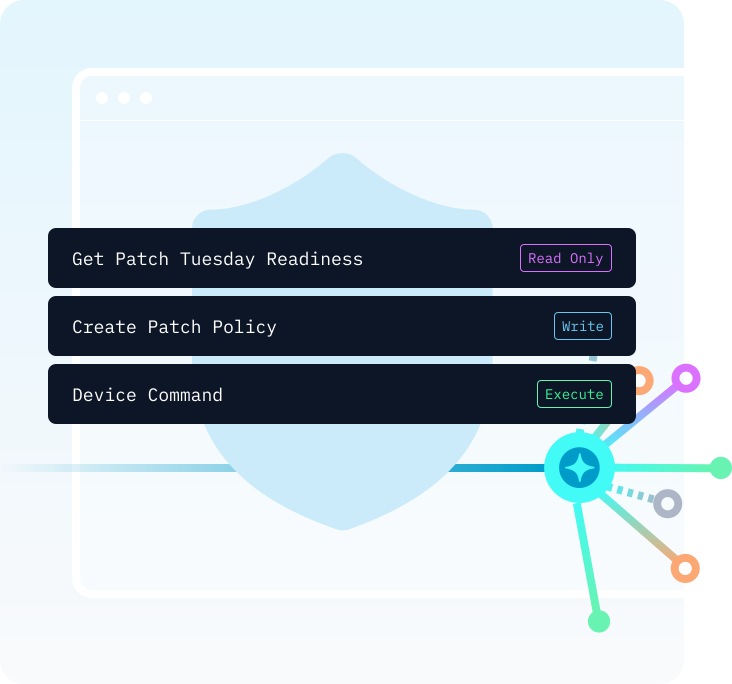
What you can do with Automox MCP
You don't need to know the tool names — just describe what you want.
“Are we ready for Patch Tuesday?”
One call returns pending patches by severity, the approval queue, and every policy's schedule — walk into Patch Tuesday knowing what's left.
“What is our compliance posture?”
Ask once: your fleet's compliance rate, every non-compliant endpoint, and why each is failing. Spend the afternoon fixing, not reporting.
“Create a critical-severity rating patch policy”
Describe the policy in plain English and Automox MCP builds it — severity filter, schedule, and notifications in the exact API format, corrections flagged first.
“What devices need attention?”
Surface the endpoints that need you today, each with its failing policy and reason. Fix first, skip the hunt.
“Show me vulnerability remediation status”
Rapid7, Qualys, or CrowdStrike exports become a live tracker: every open CVE, the endpoints hit, and the fix. Re-ask tomorrow to watch it move.
For the full list of tools, parameters, and MCP resources, see the Tool Reference.
Resources
Watch the Automox MCP Server in action
Watch the MCP server handle real IT work, end to end.

Adam Whitman
Head of Solutions Engineering

Getting started with Automox MCP in read-only mode

Creating a Patch by Severity policy from Claude Desktop

Interactive review surfaces for compliance triage

Using capability discovery to understand session context
Frequently asked questions
How do IT teams use plain language to manage endpoints at scale?
With Automox MCP Server, IT teams connect an AI agent directly to Automox and manage endpoints by describing what they need in plain English. No console navigation. No manual report pulls. No API calls. A team member can ask, "Are we ready for Patch Tuesday?" and get a full breakdown of pending patches by severity. Or say, "Create a critical-severity patch policy," and have the agent build one for review. Other MCP implementations expose only a subset of platform functionality. Automox MCP Server covers 100% of the Automox API, so teams aren't working around gaps in what the agent can reach. The agent surfaces insight and prepares action. You decide what runs.
Bring governed AI to your endpoint operations
Your endpoint operations. Your terms. Start in read-only mode, install in minutes, or talk to us about deployment.